Farm Display
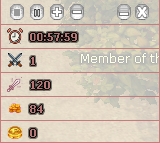
The Farm Display feature allows you to track and monitor your farming progress in real-time. Whether you're focusing on damage, monster kills, or collecting Penya and Perin, this tool helps you stay informed and optimize your farming strategy.
How to Enable
Navigate to the Start Menu 🏠
Go to Start > Custom > Farm Display.
Activate the Feature 🔛
Click the "Start/Stop" Icon to begin the monitoring.
Set the Time ⏰
Once activated, a prompt will appear to set the time (e.g., duration of your farming session). Set your preferred time and confirm.
How It Works
Once activated, the Farm Display begins tracking and displaying your farming activity.
The following data will be monitored in real-time:
Damage 💥: The total damage you’ve dealt during the farming session.
Killed Monsters 👹: The number of monsters you've defeated while farming.
Farm Penya 💰: The amount of Penya earned during the session.
Farm Perin 💎: The amount of Perin collected during the session.
This data is shown continuously until you stop the feature, or the set time expires.