Pet Filter
The Pet Filter is a helpful tool that allows you to customize which items your pet will pick up in the game. Here's how to use it:
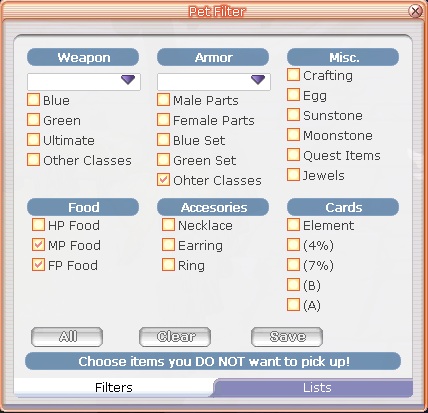
How to Use the Pet Filter
Open the Pet Filter 📂
Go to Start > Custom > Pet Filter.
Alternatively, you can press the hotkey L to open the Pet Filter window.
Pet Filter Window 🐾
Once the Pet Filter window opens, you'll see a list of items that your pet can loot.
Check Items to Exclude ❌
In the list, check the items you don’t want your pet to pick up. Your pet will automatically ignore these items during gameplay.
Save Your Preferences 💾
After you’ve selected the items to exclude, simply click Saved to apply your changes
Whitelist and Blacklist Options 📝
Whitelist ✅: Items on the whitelist will always be picked up by your pet, no matter what.
Blacklist ❌: Items on the blacklist will never be picked up by your pet, even if they’re valuable or useful.
By using these options, you can easily manage what your pet picks up, keeping your inventory tidy and ensuring that only the items you really need are gathered!